Role-Based Access Control (RBAC)
Introduction
The Role-Based Access Control (RBAC) system has been introduced in Rampart to efficiently manage and control user access to various features and resources within the application. RBAC ensures that users are granted the appropriate level of access based on their roles and responsibilities, enhancing security and reducing the risk of unauthorized actions. RBAC allows fine-grained control over what each user can do within the application.
Key Concepts
Roles
Roles are predefined sets of permissions that define a user's capabilities within the application. Each role corresponds to a specific set of tasks or responsibilities. Examples of roles might include Admin, UserAdmin, ApplicationAdmin, AppReader etc.
Permissions
Permissions are individual actions or operations that users are allowed or denied within the application. Permissions are assigned to roles, and roles are then assigned to users. We have a predefined set of permissions in Rampart and are given below.
Users Permissions
| Permission | Description |
|---|---|
| Users_List | View the user side menu, list all users, view user details |
| Users_Edit | Edit the user details. (Name, email, etc) |
| Users_Actions | Perform actions to trigger MFA reset, password reset |
| Users_Approvals | Approve of reject user's request to access an application |
| Users_Invite | Invite a user to the tenant |
| Users_Admin | Higher-level permission that encompasses all the above user permissions |
Application specific Permissions
Note: These permissions are assigned to a user on a per application basis.
| Permission | Description |
|---|---|
| App_ManageAdmins | Manage admin permissions for an application. (Assign or remove admins) |
| App_ManageSettings | Manage application's authorization policies, app laucher settings, scopes |
| App_ManageUser | Add user assignments, update user assignment status |
| App_Read | View application details and user assignments |
| App_Admin | Higher-level permission that encompasses all the above app specific permissions |
Application Permissions
Note: These permissions are applicable for all the applications.
| Permission | Description |
|---|---|
| Apps_All_ManageAdmins | Manage admin permissions for all application. (Assign or remove admins) |
| Apps_All_ManageSettings | Manage all application's authorization policies, app laucher settings, scopes |
| Apps_All_ManageUser | Add user assignments, update user assignment status to all application |
| Apps_All_Read | View all application details and user assignments |
| Apps_All_Admin | Higher-level permission that encompasses all the above app permissions. |
Settings Permissions
| Permission | Description |
|---|---|
| Settings_Write | Manage tenant wide default authorization policy, app laucher configuration and app launcher categories. |
| Settings_Read | View settings tab and default authorization policy and app launcher configuration. |
| Settings_Admin | Higher-level permission that encompasses all the above settings permissions. |
Admin Permission
| Permission | Description |
|---|---|
| Admin | Master permission which includes all the permissions defined. |
Users
Users are individuals who interact with Rampart. Each user is assigned one or more roles with Azure AD, which determine what actions they can perform.
Azure AD Built-in Roles
In Azure Active Directory (Azure AD), if another administrator or non-administrator needs to manage Azure AD resources, you assign them an Azure AD role that provides the permissions they need. We can use these roles to define roles and permissions in Rampart application.
Azure AD App Roles
Role-based access control (RBAC) is a popular mechanism to enforce authorization in applications. RBAC allows administrators to grant permissions to roles rather than to specific users or groups. The administrator can then assign roles to different users and groups to control who has access to what content and functionality. We can also use these app roles to define roles and permissions in Rampart application.
Azure AD Groups
Azure Active Directory (Azure AD) groups are used to manage users that all need the same access and permissions to resources, such as potentially restricted apps and services. Instead of adding special permissions to individual users, you create a group that applies the special permissions to every member of that group. We can also use the groups to define roles and permissions in Rampart application.
Implementation
Defining Roles and Permissions
Identify the different roles that make sense for your application (e.g., Admin, UserAdmin, ApplicationAdmin, AppReader etc).
The file rbac.config.json is to manage roles and permissions within Rampart. It consists of two sections: DirectoryRoles and ApplicationRoles. DirectoryRoles define roles with IDs linked to Azure AD built-in roles or App Roles, while ApplicationRoles define manually generated roles for managing specific application permissions.
Sample high level structure.
{
  "DirectoryRoles": [
    // ... Directory role definitions ...
  ],
  "ApplicationRoles": [
    // ... Application role definitions ...
  ]
}
Directory Roles
DirectoryRoles represent roles with IDs linked to Azure AD built-in roles or Azure AD group IDs or values of AppRoles. Each DirectoryRole entry has the following properties:
- Id: The ID of the Azure AD built-in role or Value of the App Role defined.
- Permissions: An array of permission identifiers associated with the role.
References
- The Azure AD built-in role will be returned in user's wids claim.
- The app roles for the user will be returned in user's roles claim.
Application Roles
ApplicationRoles represent roles manually generated for specific application. Each ApplicationRole entry has the following properties:
- Id: A manually generated unique ID for the role.
- Name: The name of the application role.
- Permissions: An array of permission identifiers associated with the role.
Assigning Roles to Users
These application roles will be listed in Admin permission tab when assigning an admin to the application. The admin can be a group or a user.
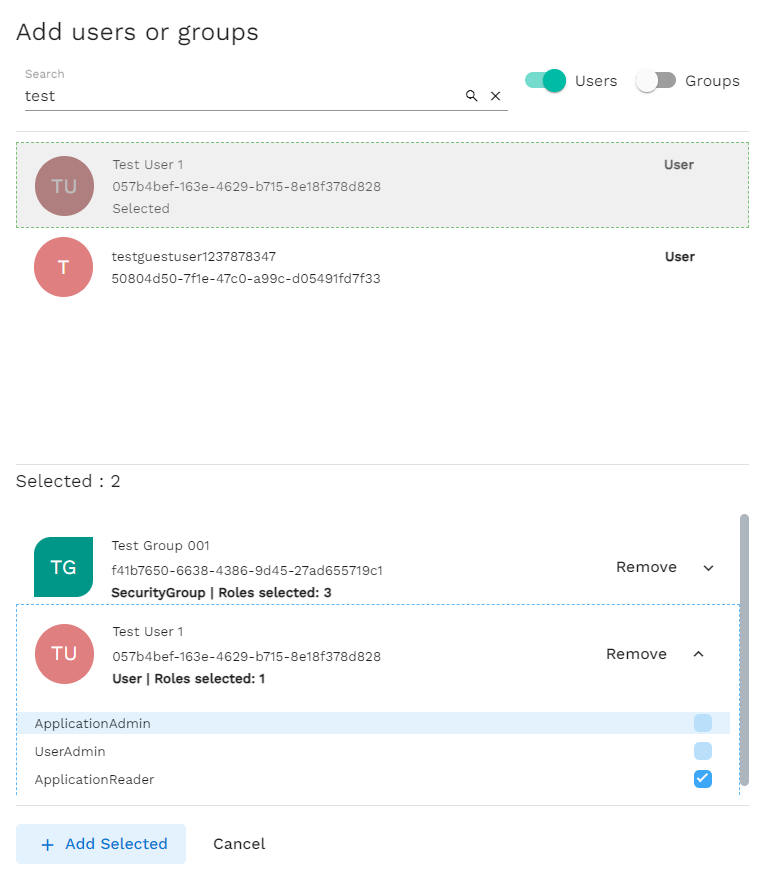
- Once assigned, these assignments will be stored in RoleAssignments documents in cosmos db.
Sample rbac.config.json
{
  "DirectoryRoles": [
    {
      "Id": "62e90394-69f5-4237-9190-012177145e10", // Global administrator - Azure AD built-in roles from wid claim in the token
      "Permissions": [
        "Admin"
      ]
    },
    {
      "Id": "administrator", // value of app role
      "Permissions": [
        "Admin"
      ]
    }
  ],
  "ApplicationRoles": [  // Ids given below are generated randomly
    {
      "Id": "a5a27ca7-853e-4782-847e-86f4cf01c51a",
      "Name": "ApplicationAdmin",
      "Permissions": [
        "App_Admin"
      ]
    },
    {
      "Id": "72c2e6f6-69be-4dc2-a881-290555dfe32e",
      "Name": "UserAdmin",
      "Permissions": [
        "App_ManageUser",
        "App_Read"
      ]
    },
    {
      "Id": "a576e821-4159-4a90-8fcd-23dea49c4825",
      "Name": "ApplicationReader",
      "Permissions": [
        "App_Read"
      ]
    }
  ]
}
SPA and Application behaviour
- The Angular SPA (Single Page Application) sends a request to the API's permissions endpoint, along with the user's token, in order to retrieve all permissions available to the user during page load.
- Within the API, the user's token is decoded to extract the values of claims such as "wids," "roles," and "groups." Subsequently, the API cross-references these claim values with the "DirectoryRoles" element present in the "rbac.config.json" configuration file. This comparison process populates the user's permissions.
- Additionally, the API retrieves application-specific permissions by querying the "RoleAssignments" collection. The merged outcome is then sent back to the SPA.
- The SPA utilizes this information to determine which UI elements should be visible to the user.
- Each endpoint within the API is protected by required permissions. The user's token is utilized to assess whether the necessary permission exists for accessing a given endpoint.
Sample JWT token
{
  "typ": "JWT",
  "alg": "RS256",
  "kid": "-KI3Q9nNR7bRofxmeZoXqbHZGew"
}.{
  .... // other claims hidden for clarity
  "groups": [ // group ids
    "04efef4e-4f27-4d1a-b5f1-aca5b3868d54",
    "15fcf3fc-fecb-48f7-86b5-33a2f478952f"
  ],
  "roles": [ // App Roles
    "administrator",
    "usersadmin"
  ],
  "wids": [ // Azure AD built in roles
    "62e90394-69f5-4237-9190-012177145e10",
    "13bd1c72-6f4a-4dcf-985f-18d3b80f208a"
  ]
}
Migrating existing instance to use RBAC
- The existing role related configuration in appsettings can be safely removed. Remove the same from app service and DevOps libraries and release pipeline mappings as they will not be used anymore.
Existing Role related configurations in appsettings.json
  "AdminRoles": {
    "GlobalAdministrator": "62e90394-69f5-4237-9190-012177145e10",
    "Application Administrator": "9b895d92-2cd3-44c7-9d02-a6ac2d5ea5c3"
  },
  "AppRoles": [
    "administrator"
  ],
rbac.config.json After migrating
{
  "DirectoryRoles": [
    {
      "Id": "62e90394-69f5-4237-9190-012177145e10", // Global administrator - Azure AD built-in roles from wid claim in the token
      "Permissions": [
        "Admin"
      ]
    },
    {
      "Id": "9b895d92-2cd3-44c7-9d02-a6ac2d5ea5c3", // Application administrator - Azure AD built-in roles from wid claim in the token
      "Permissions": [
        "Apps_All_Admin"
      ]
    },
    {
      "Id": "administrator", // value of app role
      "Permissions": [
        "Admin"
      ]
    }
  ],
  "ApplicationRoles": [
    {
      "Id": "a5a27ca7-853e-4782-847e-86f4cf01c51a", // Ensure atleast one permission is defined here.
      "Name": "ApplicationAdmin",
      "Permissions": [
        "App_Admin"
      ]
    },
  ]
}
- Since Rampart will be using rbac.config.json and RoleAssignments collection moving forward, ensure rbac.config.json is updated properly with all the requires roles and permissions.
- Existing admin permission entries in role assignments collection will not have any permissions. Ensure these users are removed and assigned again with proper permissions.
Note:
- The Azure AD groups will be returned in user's groups claim.
- Ensure token configurations are updated in azure AD app registration to return wids, roles and groups claims in the user's token.
Best Practices
- Least Privilege: Assign users the minimum necessary permissions to perform their tasks.
- Regular Review: Periodically review and update role assignments to ensure they align with current responsibilities.